Show the code
import pandas as pd
import geopandas as gpd
import contextily as cx
from janitor import drop_constant_columns
import matplotlib.pyplot as pltUrban trees are more than just greenery along our streets—they provide shade, improve air quality, and shape the character of a city. Thanks to open data initiatives, we can analyze and visualize tree inventories to better understand the composition and health of urban forests.
In this post, we’ll walk through an exploration of the City of Salinas, California’s tree inventory dataset, using Python tools like GeoPandas, Matplotlib, and Contextily to map and categorize the trees.
First we will import the packages used in this post. We can use either uv, pip, conda
import pandas as pd
import geopandas as gpd
import contextily as cx
from janitor import drop_constant_columns
import matplotlib.pyplot as pltThe data used in this analysis was downloaded from opendatasoft. We start by loading the tree inventory GeoJSON file with geopandas. Since many datasets contain placeholder values like N/A, we replace them with pandas actual NA value–pd.NA. To simplify the dataset, we also remove constant columns (columns with the same value for all rows).
inv_tbl_raw = gpd.read_file("data/tree-inventory-cityofsalinas.geojson")
non_hashable = [col for col in inv_tbl_raw.columns
if inv_tbl_raw[col].apply(lambda x: isinstance(x, (dict, list))).any()]
inv_tbl = (inv_tbl_raw
.replace("N/A", pd.NA)
.drop(columns=non_hashable)
.drop_constant_columns())
inv_tbl.head()| objectid | id | uniqueid | address | street | onstr | fromstr | tostr | side | site | ... | grow | spacesize | subzone | parkquad | zone | district | stmpvcnt | globalid | suffix | geometry | |
|---|---|---|---|---|---|---|---|---|---|---|---|---|---|---|---|---|---|---|---|---|---|
| 0 | 32031 | 30339 | IH 20140709074052 | 283 | CHAPARRAL ST | MARYAL DR | DEADEND | CHAPARRAL ST | Right | 1 | ... | Tree Lawn | 10.0 | <NA> | <NA> | <NA> | 4 | No | {FFA7B88F-19F4-4FA2-9008-C6954AA0EB05} | None | POINT (-121.64606 36.70328) |
| 1 | 32070 | 2496 | BS 20140424130746 | 183 | DENNIS AV | DENNIS AV | MIAMI ST | TAMPA ST | Front | 1 | ... | Parkway | 5.0 | <NA> | <NA> | <NA> | 2 | No | {E2350667-2941-42E7-A09B-A90151C81680} | None | POINT (-121.60828 36.67584) |
| 2 | 32084 | 8825 | BS 20140516133448 | 1271 | MORENO DR | TOWT ST | MORENO WY | PASEO GRANDE | Rear | 5 | ... | Back Up | 6.0 | <NA> | <NA> | North/East Maintenance District | 1 | No | {37810329-E153-4E5B-9AFE-6F9CFD3C60BD} | None | POINT (-121.60241 36.68795) |
| 3 | 32085 | 8833 | BS 20140516134752 | 1255 | MORENO DR | TOWT ST | MORENO WY | PASEO GRANDE | Rear | 1 | ... | Back Up | 7.0 | <NA> | <NA> | North/East Maintenance District | 1 | No | {C56D21E6-D6EA-4F76-941C-5C8CEBC53826} | None | POINT (-121.60308 36.68762) |
| 4 | 32092 | 9077 | BS 20140519122755 | 1252 | MORENO DR | MORENO DR | CAMARILLO CT | CAYUCOS CIR | Front | 1 | ... | Tree Lawn | 10.0 | <NA> | <NA> | North/East Maintenance District | 1 | No | {DBDAD81C-8515-4AD0-A5EA-39291339AADD} | None | POINT (-121.60291 36.68721) |
5 rows × 34 columns
We have interesting variables available in the dataset, but, we do not need all.
inv_tbl.columnsIndex(['objectid', 'id', 'uniqueid', 'address', 'street', 'onstr', 'fromstr',
'tostr', 'side', 'site', 'spp', 'dbh', 'stems', 'height', 'width',
'condstruc', 'condcrwn', 'cond', 'ohutility', 'klir', 'inspect',
'hdscape', 'vsiblty', 'sound', 'grow', 'spacesize', 'subzone',
'parkquad', 'zone', 'district', 'stmpvcnt', 'globalid', 'suffix',
'geometry'],
dtype='object')We’ll only make use of spp, dbh, geometry, and cond .
retain_col = [
"spp", "dbh",
"stems", "height",
"width", "cond",
"grow","geometry"
]
inv_tbl = inv_tbl.loc[:, retain_col]
inv_tbl.head()| spp | dbh | stems | height | width | cond | grow | geometry | |
|---|---|---|---|---|---|---|---|---|
| 0 | Fraxinus spp. | 1.0 | 1.0 | 0 to 10 | 0 to 10 | <NA> | Tree Lawn | POINT (-121.64606 36.70328) |
| 1 | Fraxinus oxycarpa | 7.0 | 1.0 | 21 to 30 | 21 to 30 | Fair | Parkway | POINT (-121.60828 36.67584) |
| 2 | Pyrus calleryana | 10.0 | 1.0 | 21 to 30 | 21 to 30 | Good | Back Up | POINT (-121.60241 36.68795) |
| 3 | Celtis sinensis | 11.0 | 1.0 | 21 to 30 | 21 to 30 | Fair | Back Up | POINT (-121.60308 36.68762) |
| 4 | Quercus ilex | 11.0 | 1.0 | 21 to 30 | 21 to 30 | Good | Tree Lawn | POINT (-121.60291 36.68721) |
Table 2 shows the retained columns. The data is currently using the WGS 84 Geographic coordinate reference system.
inv_tbl.crs<Geographic 2D CRS: EPSG:4326>
Name: WGS 84
Axis Info [ellipsoidal]:
- Lat[north]: Geodetic latitude (degree)
- Lon[east]: Geodetic longitude (degree)
Area of Use:
- name: World.
- bounds: (-180.0, -90.0, 180.0, 90.0)
Datum: World Geodetic System 1984 ensemble
- Ellipsoid: WGS 84
- Prime Meridian: GreenwichLet’s take a quick view of how the trees are planted in Salinas. We will convert to a mercator projector to work well with contextily.
inv_tbl = inv_tbl.to_crs(epsg=3857)
fig, ax = plt.subplots(figsize=(10, 6))
inv_tbl.plot(
ax=ax,
color="red",
alpha=0.4,
markersize=2
)
cx.add_basemap(ax, source=cx.providers.OpenTopoMap)
plt.axis("off")
plt.tight_layout()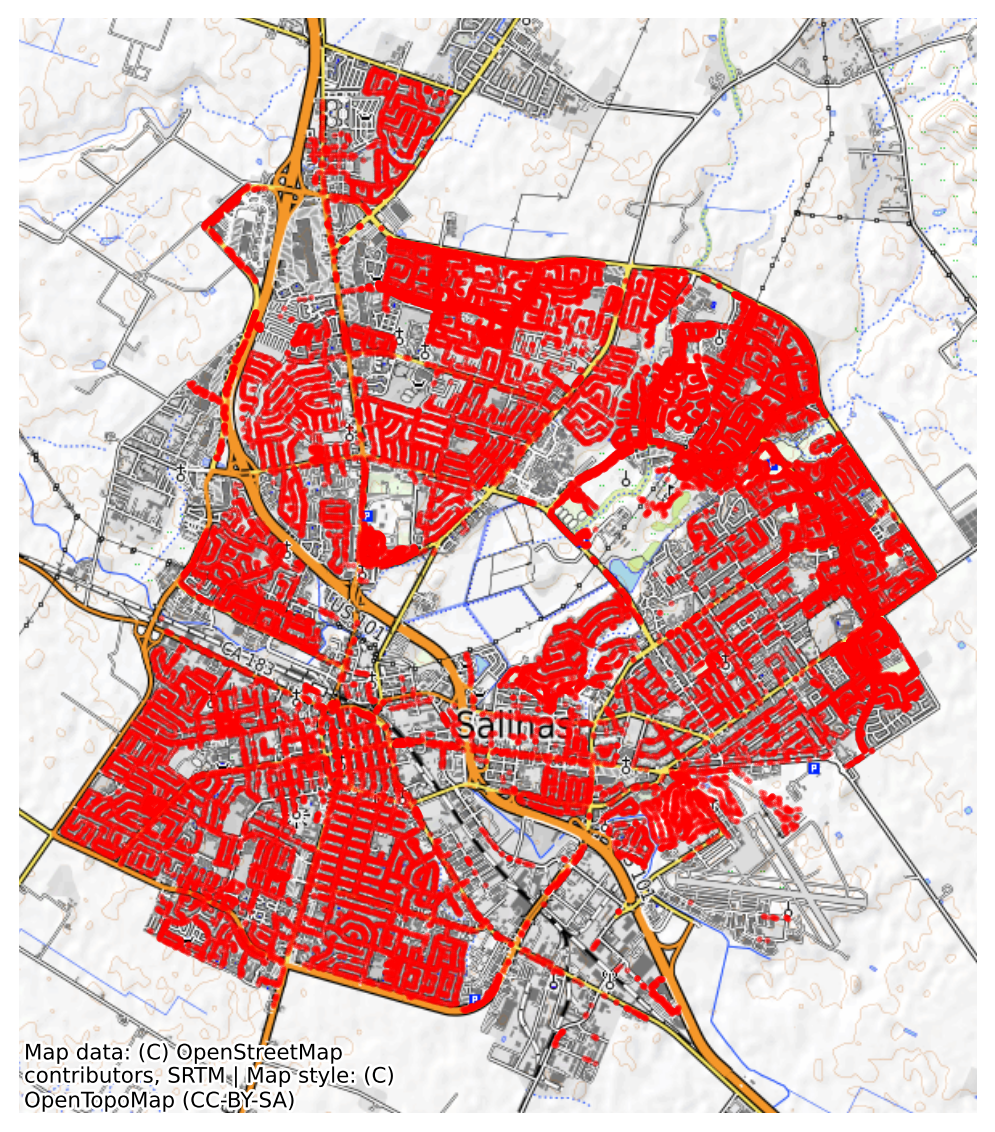
Figure 1 gives us a city-wide snapshot of tree distribution in Salinas and we can tell that Salinas is quite green.
inv_tbl.explore(
column="grow",
categorical=True,
)The overwhelming majority of trees in Salinas grow in parkways and tree lawns, reflecting the city’s street-tree planting strategy. Fewer trees are in medians, parking lot islands, or raised planters, where space and soil volume are more constrained. Very few trees are in unmaintained areas, which makes sense since street tree programs usually focus on maintained urban spaces.
grow_counts = (
inv_tbl.groupby("grow")["height"]
.value_counts()
.unstack(fill_value=0)
)
grow_counts["total"] = grow_counts.sum(axis=1)
grow_counts = grow_counts.sort_values("total", ascending = False).drop(columns = "total")
fig, ax = plt.subplots(figsize=(12, 6))
grow_counts.plot(
kind="bar",
ax=ax,
stacked=False,
alpha=0.8,
fontsize=8,
colormap="tab20",
edgecolor="#666666",
legend=True,
linewidth=0.2
)
ax.set_xlabel("Growing Space", fontsize=10)
ax.set_ylabel("Number of Trees", fontsize=10)
ax.set_title(
label="Distribution of Trees by Growing Space and Height Category in Salinas",
fontsize=13,
fontweight="bold"
)
plt.xticks(rotation=40, ha="right")
ax.legend(
title = "Height",
bbox_to_anchor=(1.02, 1),
loc="upper left",
fontsize=8,
title_fontsize=10
)
ax.grid(axis="y", linestyle="--", alpha=0.6)
plt.tight_layout()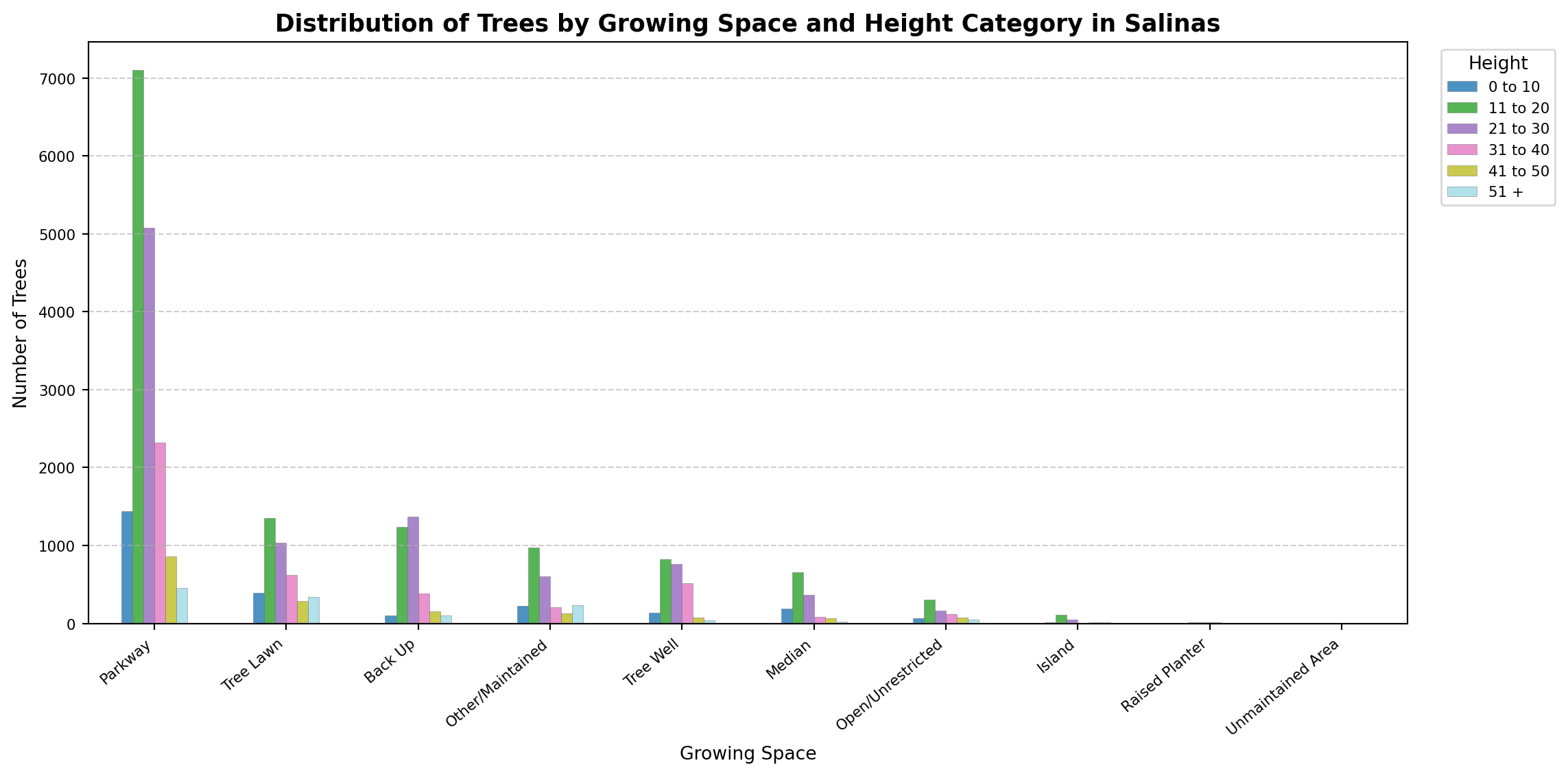
Figure 3 further confirms what is suspected by Figure 2. Tree Lawn, Other/Maintained and Backup Seems to possess a large number of tall trees given their number compare to Parkway trees.

While we have a lot of trees, not all all species are equally represented, Table 3 shows species count.
inv_tbl["spp"].value_counts(ascending=False).head(20)spp
Liquidambar styraciflua 3147
Pyrus calleryana 3033
Platanus X acerifolia 2198
Prunus cerasifera var. atropurpurea 1751
Magnolia grandiflora 1735
Stump 1447
Quercus agrifolia 1207
Celtis sinensis 1145
Fraxinus oxycarpa 982
Cinnamomum camphora 803
Pyrus kawakamii 779
Quercus ilex 694
Prunus serrulata 642
Maytenus boaria 615
Sequoia sempervirens 509
Pinus canariensis 471
Zelkova serrata 413
Geijera parviflora 410
Vacant site, small 373
Gleditsia triacanthos 370
Name: count, dtype: int64To focus on the most common ones, we count species and filter for those with at least 1,000 occurrences, see Table 4.
species_count = inv_tbl["spp"].value_counts()
common_species = species_count[species_count >= 1000].index
common_trees = inv_tbl[inv_tbl["spp"].isin(common_species)]
common_trees["spp"].value_counts()spp
Liquidambar styraciflua 3147
Pyrus calleryana 3033
Platanus X acerifolia 2198
Prunus cerasifera var. atropurpurea 1751
Magnolia grandiflora 1735
Stump 1447
Quercus agrifolia 1207
Celtis sinensis 1145
Name: count, dtype: int64We can plot them on a OpenStreetMap Mapnik basemap.
fig, ax = plt.subplots(figsize=(12, 6))
common_trees.plot(
ax=ax,
column="spp",
categorical=True,
legend=True,
markersize=1.5
)
cx.add_basemap(ax, source=cx.providers.OpenStreetMap.Mapnik)
plt.title(
"Common Tree Species in Salinas, California",
fontsize=12,
fontweight="bold"
)
plt.axis("off")
leg = ax.get_legend()
leg.set_title("Species", prop={'size': 8})
for text in leg.get_texts():
text.set_fontsize(6)
leg.get_frame().set_alpha(0.8)
leg.set_bbox_to_anchor((1.02, 1))
leg.set_loc("upper left")
plt.tight_layout()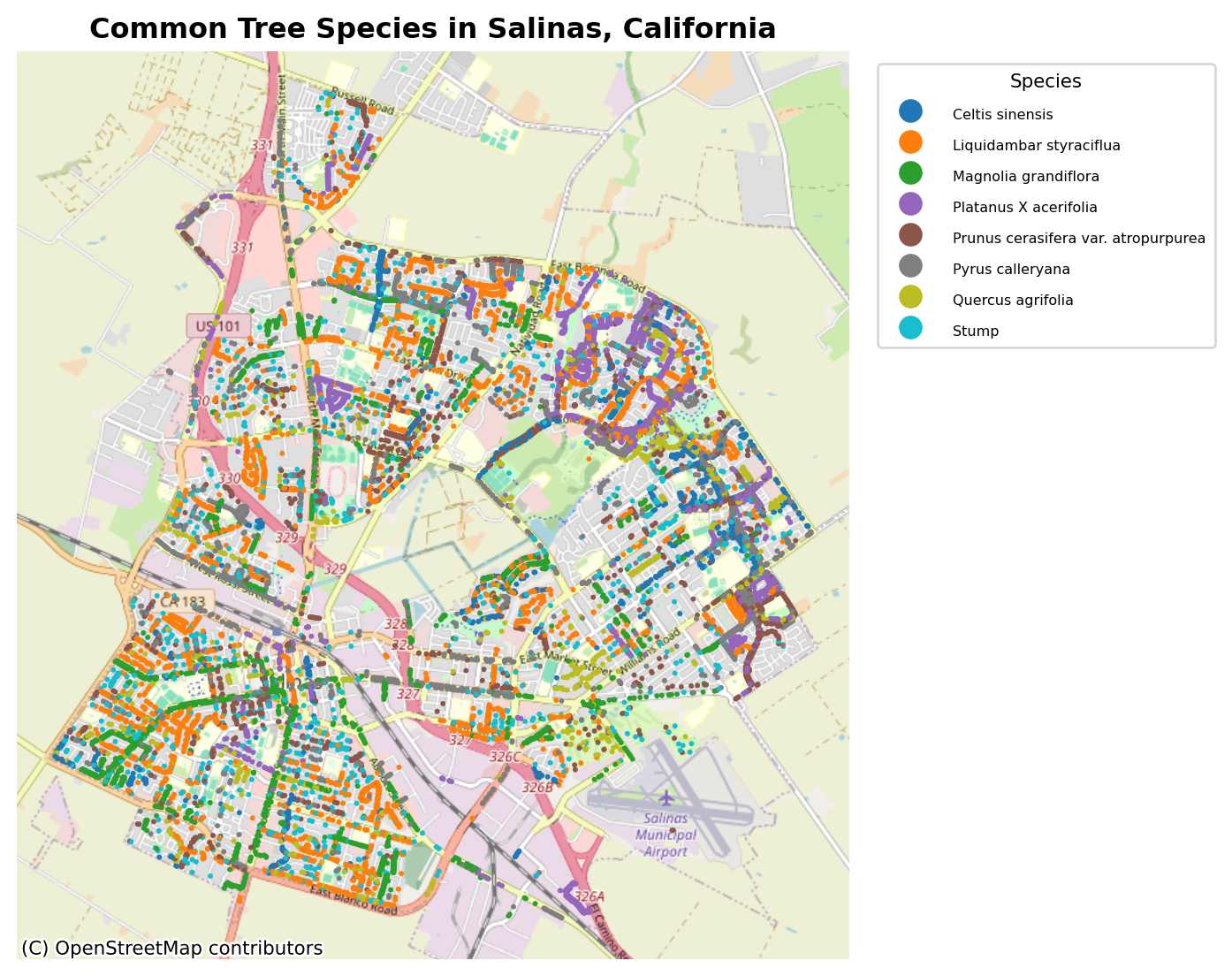
Here, Figure 4 shows the species that dominate the city’s streets.
Let’s explore the height and width of the inventory data. First, we will remove trees with missing height and width category. Next, we will categorized the trees into size classes using their DBH:
trees_with_dim = common_trees.dropna(subset=["height","width"])
trees_with_dim["tree_class"] = pd.cut(
trees_with_dim["dbh"],
bins=[0, 20, 40, 60],
labels=["small","medium","large"]
)Visualizing the tree size categories gives a clear picture of the structural diversity:
ax = trees_with_dim.plot(
column="tree_class",
categorical=True,
cmap="viridis",
legend=True, alpha=0.8,
markersize = 5
)
cx.add_basemap(ax, source=cx.providers.OpenTopoMap)
plt.axis("off")
legend = ax.get_legend()
legend.set_title("Tree DBH Class", prop={"size": 9})
for text in legend.get_texts():
text.set_fontsize(6)
legend.get_frame().set_alpha(.8)
legend.set_bbox_to_anchor((1.02, 1))
legend.set_loc("upper right")
plt.title(
"Tree Sizes in Salinas, California",
fontsize=10,
fontweight="bold"
)
plt.tight_layout()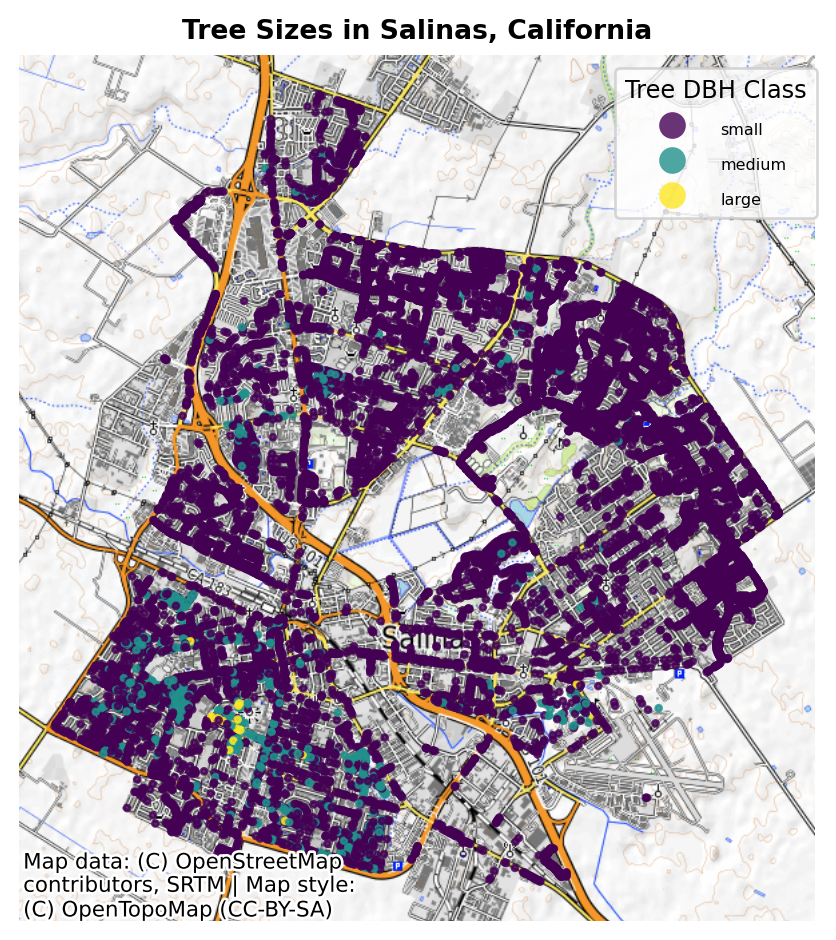
Let’s explore the health condition of the trees.
common_trees.explore(
column="cond",
categorical=True
)Most of the trees are in a fair to good health state.
Salinas’ tree inventory contains thousands of mapped trees, each with attributes like species, size, and condition. Visualization reveals both species distribution and structural variation across the city.
Categorizing trees into size classes highlights urban forestry trends that could inform management, replacement, and planting decisions. By combining open data with Python’s geospatial stack, we can turn raw tree inventories into insights for greener, healthier cities.