Statistical Analysis of Environmental Data

CIFAG Webinar

Olamide Adu

2026-04-11

About me

  • Founder, EU StudyAssist
  • Data scientist
  • Educator

How I Got Here

  • 2014-2019: Bachelors - Forestry
  • 2020-2021 : Teaching Assistant
  • 2021-2023: MSc. Forestry
  • 2023-: Data Science Consultancy
  • 2024-: EU StudyAssist

Important

Visit www.eustudyassist.com to know more about EU StudyAssist

What Is This Talk About?

In this talk we will …

  • go through the typical life cycle of environmental data.
  • do some data exploration for environmental data, check trends, relationship and more.
  • model relationships with Linear Regression.
  • diagnose model reliability.

Data analysis | Source: undraw.co

Data analysis | Source: undraw.co

Important

While R is used in this talk, the focus is not just on the statistical tool or a single technique.

Environmental Data

Environmental Data Characteristics

Environmental datasets are unique and often challenging:

  • Expensive to acquire: inventory data; crop measurements
  • Missing Data: Sensors fail; weather happens; inaccessible!
  • Measurement Bias: Different instruments, different results.
  • Temporal Dependence: Observations can be time-series (e.g., daily sensor data).
  • Spatial Autocorrelation: Sites closer together tend to share similar properties.

Forest | Source: undraw.com

Forest | Source: undraw.com

Analyzing Environmental Data

The Data

  • Algeria wildfire dataset.
  • Occurrence of wild fire
  • Estimate the danger of wildfire occurring.

variables of interest

  • occurrence of a wildfire during the summer (fire/no fire)
  • FWI of forest

Note

Forest Weather Index (FWI) is a global index that estimates wildfire danger by calculating fuel moisture and fire behavior based on temperature, relative humidity, wind speed, and precipitation.

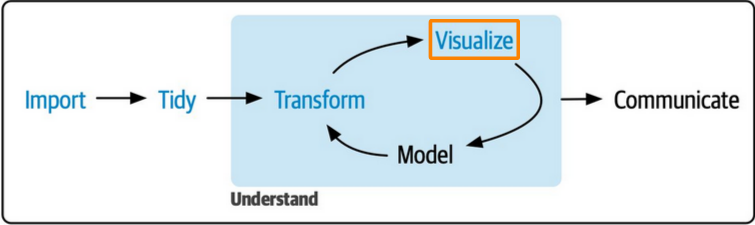
Data Science/Analysis Workflow
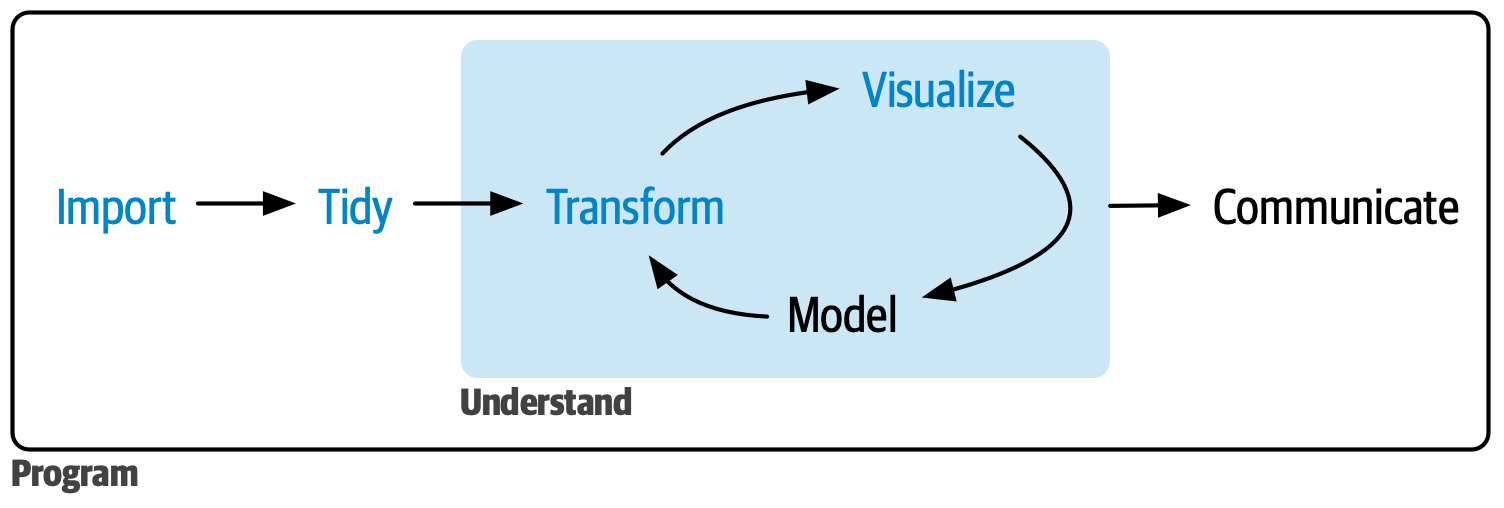
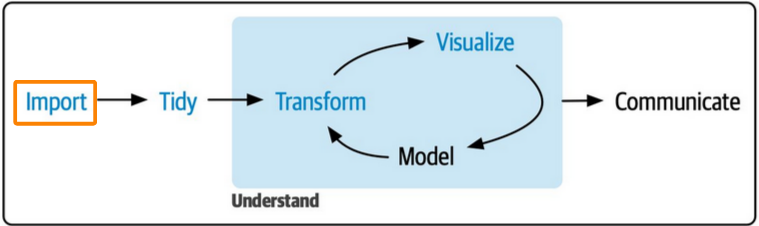
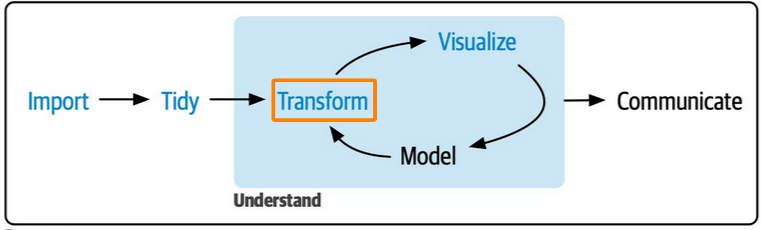
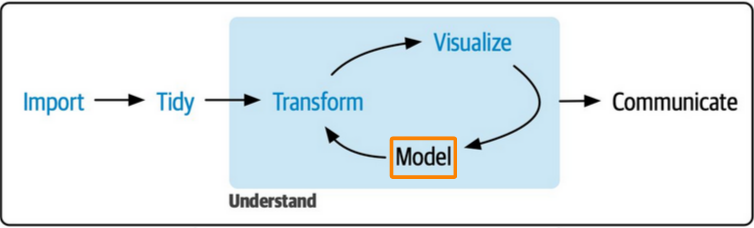
Data science workflow by Hadley Wickham. Source: R4DS

Data science workflow by Hadley Wickham. Source: R4DS

STEP I: Data Import

algeria_raw <- read_csv(
  file = "algeria_dt.csv",
  skip = 1
) |> 
  janitor::clean_names()

algeria_raw 
# A tibble: 246 × 14
   day   month year  temperature rh    ws    rain  ffmc  dmc   dc    isi   bui  
   <chr> <chr> <chr> <chr>       <chr> <chr> <chr> <chr> <chr> <chr> <chr> <chr>
 1 01    06    2012  29          57    18    0     65.7  3.4   7.6   1.3   3.4  
 2 02    06    2012  29          61    13    1.3   64.4  4.1   7.6   1     3.9  
 3 03    06    2012  26          82    22    13.1  47.1  2.5   7.1   0.3   2.7  
 4 04    06    2012  25          89    13    2.5   28.6  1.3   6.9   0     1.7  
 5 05    06    2012  27          77    16    0     64.8  3     14.2  1.2   3.9  
 6 06    06    2012  31          67    14    0     82.6  5.8   22.2  3.1   7    
 7 07    06    2012  33          54    13    0     88.2  9.9   30.5  6.4   10.9 
 8 08    06    2012  30          73    15    0     86.6  12.1  38.3  5.6   13.5 
 9 09    06    2012  25          88    13    0.2   52.9  7.9   38.8  0.4   10.5 
10 10    06    2012  28          79    12    0     73.2  9.5   46.3  1.3   12.6 
# ℹ 236 more rows
# ℹ 2 more variables: fwi <chr>, classes <chr>

Data import is the entry point into analysis after data collection or acquisition

Data import is the entry point into analysis after data collection or acquisition

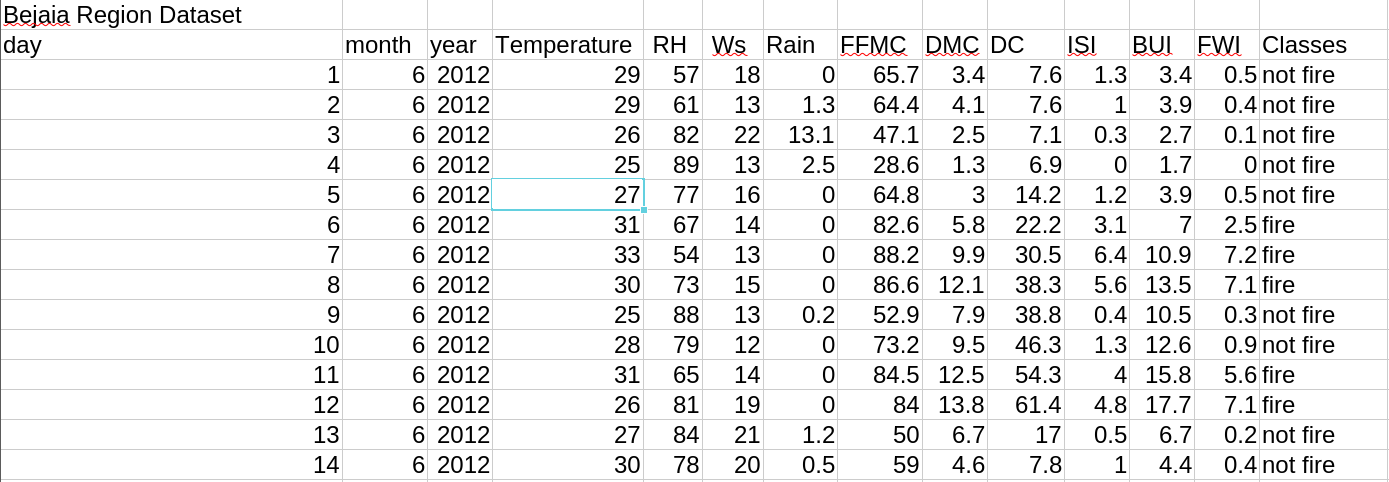
Spreadsheet snapshot of Algeria’s wildfire data

Spreadsheet snapshot of Algeria’s wildfire data

Exploratory Data Analysis (EDA)

  • Cleaning: Handling missing values; unit conversions; general cleaning.
  • Transformation: filtering data, summarizing, and working on data as a group.
  • Visualization: Trends, distributions, and outliers.
  • Correlation: Do variables move together?
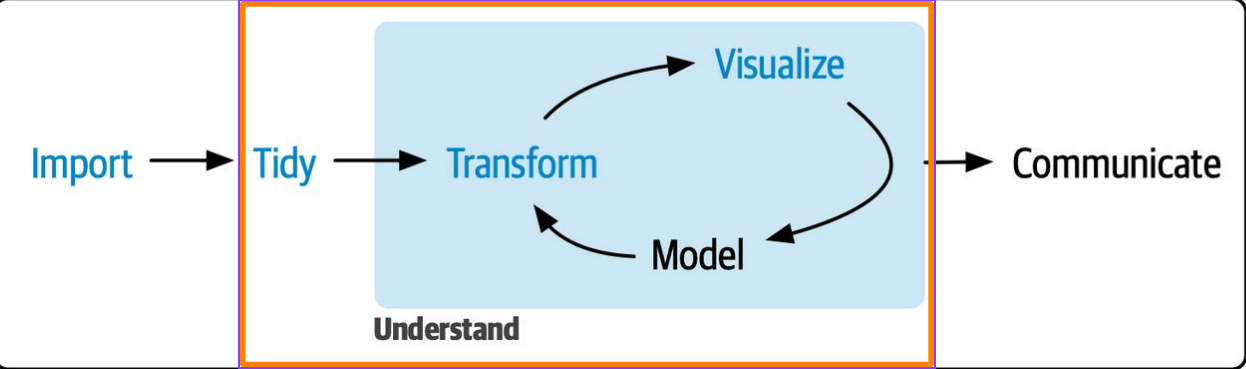
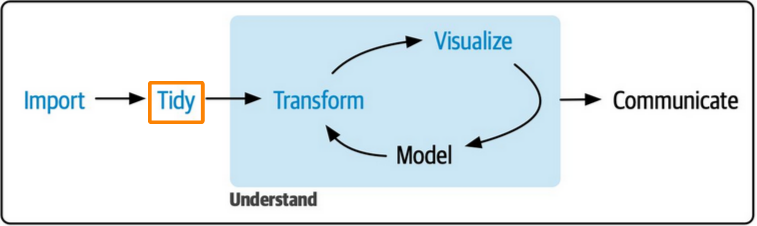
Exploratory data analysis process includes tidying, transforming, and visualizing a data

Exploratory data analysis process includes tidying, transforming, and visualizing a data

Data exploration is a thorough repetitive process

STEP II: Tidy

  • Confirm property of your data
  • Get quick summary of data
  • Try to identify discrepancies in your data
  • Remove or impute rows
  • Ensure variables have the right data types
  • Check for outliers

Tidying data includes data cleaning amongst other steps

Tidying data includes data cleaning amongst other steps

STEP II: Tidy …

Confirm the data property

glimpse(algeria_raw)
Rows: 246
Columns: 14
$ day         <chr> "01", "02", "03", "04", "05", "06", "07", "08", "09", "10"…
$ month       <chr> "06", "06", "06", "06", "06", "06", "06", "06", "06", "06"…
$ year        <chr> "2012", "2012", "2012", "2012", "2012", "2012", "2012", "2…
$ temperature <chr> "29", "29", "26", "25", "27", "31", "33", "30", "25", "28"…
$ rh          <chr> "57", "61", "82", "89", "77", "67", "54", "73", "88", "79"…
$ ws          <chr> "18", "13", "22", "13", "16", "14", "13", "15", "13", "12"…
$ rain        <chr> "0", "1.3", "13.1", "2.5", "0", "0", "0", "0", "0.2", "0",…
$ ffmc        <chr> "65.7", "64.4", "47.1", "28.6", "64.8", "82.6", "88.2", "8…
$ dmc         <chr> "3.4", "4.1", "2.5", "1.3", "3", "5.8", "9.9", "12.1", "7.…
$ dc          <chr> "7.6", "7.6", "7.1", "6.9", "14.2", "22.2", "30.5", "38.3"…
$ isi         <chr> "1.3", "1", "0.3", "0", "1.2", "3.1", "6.4", "5.6", "0.4",…
$ bui         <chr> "3.4", "3.9", "2.7", "1.7", "3.9", "7", "10.9", "13.5", "1…
$ fwi         <chr> "0.5", "0.4", "0.1", "0", "0.5", "2.5", "7.2", "7.1", "0.3…
$ classes     <chr> "not fire", "not fire", "not fire", "not fire", "not fire"…

STEP II: Tidy …

Get quick summary of the data

skimr::skim(algeria_raw)
Data summary
Name algeria_raw
Number of rows 246
Number of columns 14
_______________________
Column type frequency:
character 14
________________________
Group variables None

Variable type: character

skim_variable n_missing complete_rate min max empty n_unique whitespace
day 0 1 2 29 0 33 0
month 1 1 2 5 0 5 0
year 1 1 4 4 0 2 0
temperature 1 1 2 11 0 20 0
rh 1 1 2 2 0 63 0
ws 1 1 1 2 0 19 0
rain 1 1 1 4 0 40 0
ffmc 1 1 2 4 0 174 0
dmc 1 1 1 4 0 167 0
dc 1 1 1 5 0 199 0
isi 1 1 1 4 0 107 0
bui 1 1 1 4 0 174 0
fwi 1 1 1 4 0 127 0
classes 1 1 4 8 0 3 0

STEP II: Tidy …

Get data discrepancies

Table 1: Preview of observations with missing values and extra column name
algeria_raw |> 
  mutate(
    id = row_number(),
    .before = day
  ) |> 
  filter(between(id, 122, 125))
# A tibble: 4 × 15
     id day    month year  temperature rh    ws    rain  ffmc  dmc   dc    isi  
  <int> <chr>  <chr> <chr> <chr>       <chr> <chr> <chr> <chr> <chr> <chr> <chr>
1   122 30     09    2012  25          78    14    1.4   45    1.9   7.5   0.2  
2   123 Sidi-… <NA>  <NA>  <NA>        <NA>  <NA>  <NA>  <NA>  <NA>  <NA>  <NA> 
3   124 day    month year  Temperature RH    Ws    Rain  FFMC  DMC   DC    ISI  
4   125 01     06    2012  32          71    12    0.7   57.1  2.5   8.2   0.6  
# ℹ 3 more variables: bui <chr>, fwi <chr>, classes <chr>

STEP II: Tidy …

Remove empty rows

algeria_raw |>
  drop_na() |> 
  filter(day != "day") 
# A tibble: 244 × 14
   day   month year  temperature rh    ws    rain  ffmc  dmc   dc    isi   bui  
   <chr> <chr> <chr> <chr>       <chr> <chr> <chr> <chr> <chr> <chr> <chr> <chr>
 1 01    06    2012  29          57    18    0     65.7  3.4   7.6   1.3   3.4  
 2 02    06    2012  29          61    13    1.3   64.4  4.1   7.6   1     3.9  
 3 03    06    2012  26          82    22    13.1  47.1  2.5   7.1   0.3   2.7  
 4 04    06    2012  25          89    13    2.5   28.6  1.3   6.9   0     1.7  
 5 05    06    2012  27          77    16    0     64.8  3     14.2  1.2   3.9  
 6 06    06    2012  31          67    14    0     82.6  5.8   22.2  3.1   7    
 7 07    06    2012  33          54    13    0     88.2  9.9   30.5  6.4   10.9 
 8 08    06    2012  30          73    15    0     86.6  12.1  38.3  5.6   13.5 
 9 09    06    2012  25          88    13    0.2   52.9  7.9   38.8  0.4   10.5 
10 10    06    2012  28          79    12    0     73.2  9.5   46.3  1.3   12.6 
# ℹ 234 more rows
# ℹ 2 more variables: fwi <chr>, classes <chr>

STEP II: Tidy …

Correct wrong data types

algeria_raw |> 
  drop_na() |> 
  filter(day != "day") |> 
  mutate(
    across(day:fwi, as.numeric),
    classes = factor(x = classes)
  )
# A tibble: 244 × 14
     day month  year temperature    rh    ws  rain  ffmc   dmc    dc   isi   bui
   <dbl> <dbl> <dbl>       <dbl> <dbl> <dbl> <dbl> <dbl> <dbl> <dbl> <dbl> <dbl>
 1     1     6  2012          29    57    18   0    65.7   3.4   7.6   1.3   3.4
 2     2     6  2012          29    61    13   1.3  64.4   4.1   7.6   1     3.9
 3     3     6  2012          26    82    22  13.1  47.1   2.5   7.1   0.3   2.7
 4     4     6  2012          25    89    13   2.5  28.6   1.3   6.9   0     1.7
 5     5     6  2012          27    77    16   0    64.8   3    14.2   1.2   3.9
 6     6     6  2012          31    67    14   0    82.6   5.8  22.2   3.1   7  
 7     7     6  2012          33    54    13   0    88.2   9.9  30.5   6.4  10.9
 8     8     6  2012          30    73    15   0    86.6  12.1  38.3   5.6  13.5
 9     9     6  2012          25    88    13   0.2  52.9   7.9  38.8   0.4  10.5
10    10     6  2012          28    79    12   0    73.2   9.5  46.3   1.3  12.6
# ℹ 234 more rows
# ℹ 2 more variables: fwi <dbl>, classes <fct>

STEP II: Tidy …

Create columns if needed

algeria_tbl <- algeria_raw |> 
  drop_na() |> 
  filter(day != "day") |> 
  mutate(
    across(day:fwi, as.numeric),
    classes = factor(x = classes)
  ) |> 
  mutate(
    date = make_date(year, month, day),
    id = row_number(),
    region = ifelse(between(id, 1, 122), "Bejaia", "Sidi-Bel Addes"),
    .before = day
  ) |> 
  select(-id)

algeria_tbl
# A tibble: 244 × 16
   date       region   day month  year temperature    rh    ws  rain  ffmc   dmc
   <date>     <chr>  <dbl> <dbl> <dbl>       <dbl> <dbl> <dbl> <dbl> <dbl> <dbl>
 1 2012-06-01 Bejaia     1     6  2012          29    57    18   0    65.7   3.4
 2 2012-06-02 Bejaia     2     6  2012          29    61    13   1.3  64.4   4.1
 3 2012-06-03 Bejaia     3     6  2012          26    82    22  13.1  47.1   2.5
 4 2012-06-04 Bejaia     4     6  2012          25    89    13   2.5  28.6   1.3
 5 2012-06-05 Bejaia     5     6  2012          27    77    16   0    64.8   3  
 6 2012-06-06 Bejaia     6     6  2012          31    67    14   0    82.6   5.8
 7 2012-06-07 Bejaia     7     6  2012          33    54    13   0    88.2   9.9
 8 2012-06-08 Bejaia     8     6  2012          30    73    15   0    86.6  12.1
 9 2012-06-09 Bejaia     9     6  2012          25    88    13   0.2  52.9   7.9
10 2012-06-10 Bejaia    10     6  2012          28    79    12   0    73.2   9.5
# ℹ 234 more rows
# ℹ 5 more variables: dc <dbl>, isi <dbl>, bui <dbl>, fwi <dbl>, classes <fct>

STEP III: Transform

This step includes:

  • filtering data
  • getting summaries
algeria_raw |> 
  drop_na() |> 
  filter(day != "day") |> 
  mutate(
    across(day:fwi, as.numeric),
    classes = factor(classes)
  )

STEP III: Transform …

Fire occurrence

Table 2: Frequency of fire occurrences in Algeria’s forest
algeria_tbl |> 
  count(classes, name = "count")
# A tibble: 2 × 2
  classes  count
  <fct>    <int>
1 fire       138
2 not fire   106

STEP III: Transform …

Region count

Table 3: Frequency of observations by region.
algeria_tbl |> 
  count(region, name = "count")
# A tibble: 2 × 2
  region         count
  <chr>          <int>
1 Bejaia           122
2 Sidi-Bel Addes   122

STEP III: Transform …

Table 4: Frequency and mean FWI for occurrence class according to region.
algeria_tbl |> 
  summarize(
    .by = c(region, classes),
    frequency = n(),
    average_fwi = mean(fwi)
  )
# A tibble: 4 × 4
  region         classes  frequency average_fwi
  <chr>          <fct>        <int>       <dbl>
1 Bejaia         not fire        63       0.933
2 Bejaia         fire            59      10.5  
3 Sidi-Bel Addes not fire        43       1.01 
4 Sidi-Bel Addes fire            79      12.6  

Note

While this is an important step when working on environmental data, some of its results are best answered with visuals.

STEP IV: Visualize

A working plan

  • focus on variables of interest first
  • focus on other variables next
  • visualize relationships between variables
STEP IV: Visualize …

Response variable (fire occurrence)

  • Univariate plot
  • Categorical data
Code
algeria_tbl |> 
  ggplot(aes(classes))  +
  geom_bar(fill = "#AA4243") +
  labs(
    y = "Count",
    title = "Frequency of wildfire occurrence class in Algeria",
    subtitle = "Wildfire occurs more often than not in Algeria's Forest",
    caption = "Data source: UCI Machine Learning Repository | Adu O. M."
  ) +
  scale_y_continuous(
    breaks = seq(0, 150, 30),
    limits = c(0, 150)
  ) +
  theme_light(
    base_size = 24,
    base_family = "bsk"
  ) +
  coord_cartesian(expand = FALSE) +
  theme(
    plot.title.position = "plot",
    plot.title = element_text(
      colour = "#AA4203",
      family = title_font,
      size = 48,
      margin = margin(b = 5, unit = "pt")
    ),
    axis.title.x = element_blank(),
    plot.subtitle = element_text(color = "#dc730e"),
    axis.text = element_text(color = "#AA4203"),
    axis.title.y = element_text(color = "#AA4203")
  )
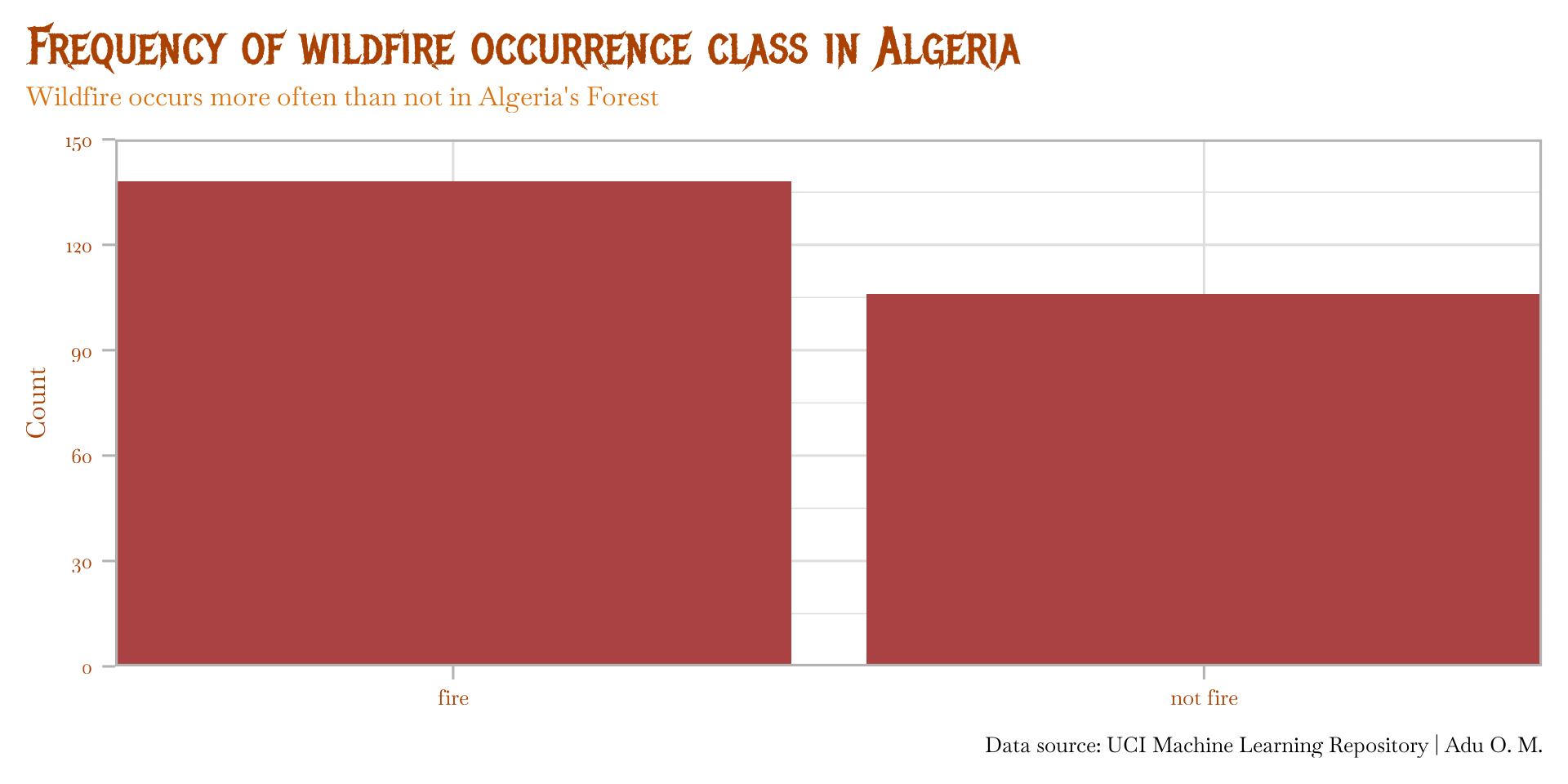
Figure 1

STEP IV: Visualize …

Response Variable (FWI)

  • Univariate plot
  • Continuous data
Code
algeria_tbl |> 
  ggplot(aes(fwi)) +
  geom_histogram(
    stat = "density",
    col = "#dc730e"
  ) +
  geom_density(
    linewidth = 1.3,
    col = "#AA4203"
  ) +
  theme_clean(
    base_size = 32,
    base_family = main_font_2
  ) +
  scale_y_continuous(
    breaks = seq(0, .1, .02),
    limits = c(0, .1)
  ) +
  labs(
    x = "Forest Weather Index",
    y = "Density",
    title = "Distribution of FWI",
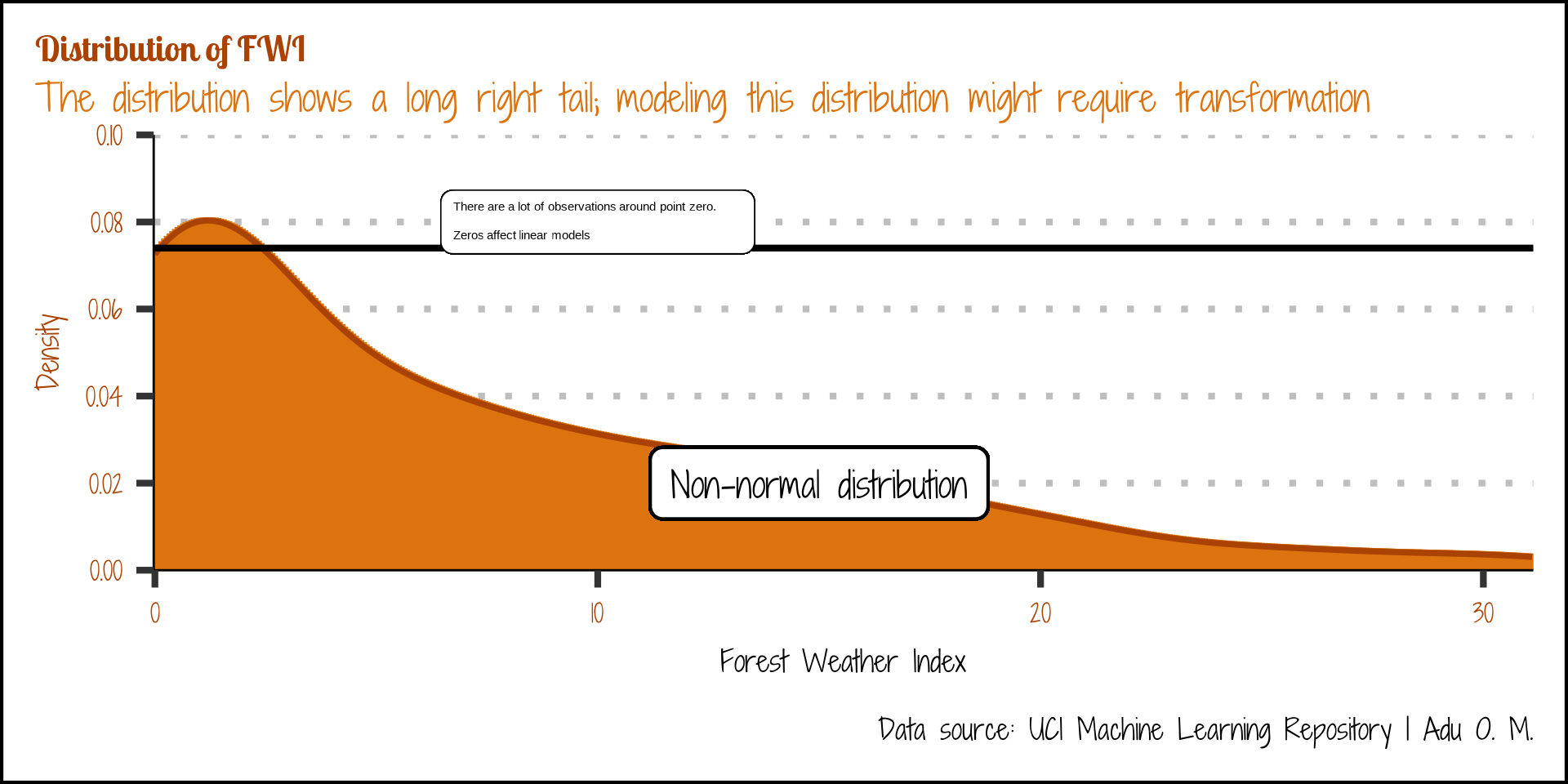
    subtitle = "The distribution shows a long right tail; modeling this distribution might require transformation",
    caption = "Data source: UCI Machine Learning Repository | Adu O. M."
  ) +
  coord_cartesian(expand = FALSE) +
  theme(
    plot.title.position = "plot",
    plot.title = element_text(
      colour = "#AA4203",
      family = title_font_2,
      size = 32,
      margin = margin(b = 5, unit = "pt")
    ),
    plot.subtitle = element_textbox_simple(
      color = "#dc730e",
      margin = margin(b = 5, unit = "pt")
    ),
    axis.text = element_text(color = "#AA4203"),
    axis.title.y = element_text(color = "#AA4203")
  )
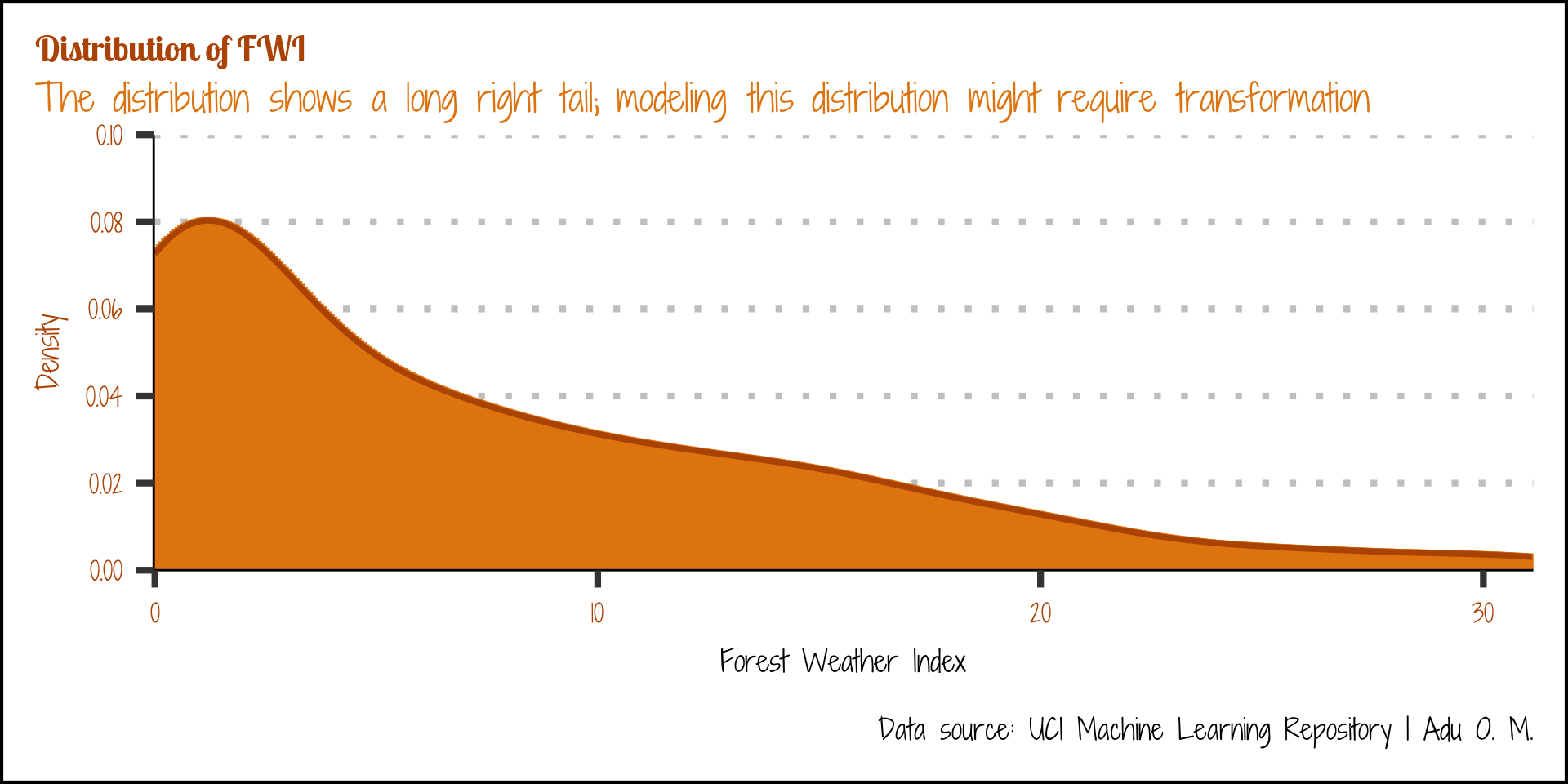
Figure 2

STEP IV: Visualize …

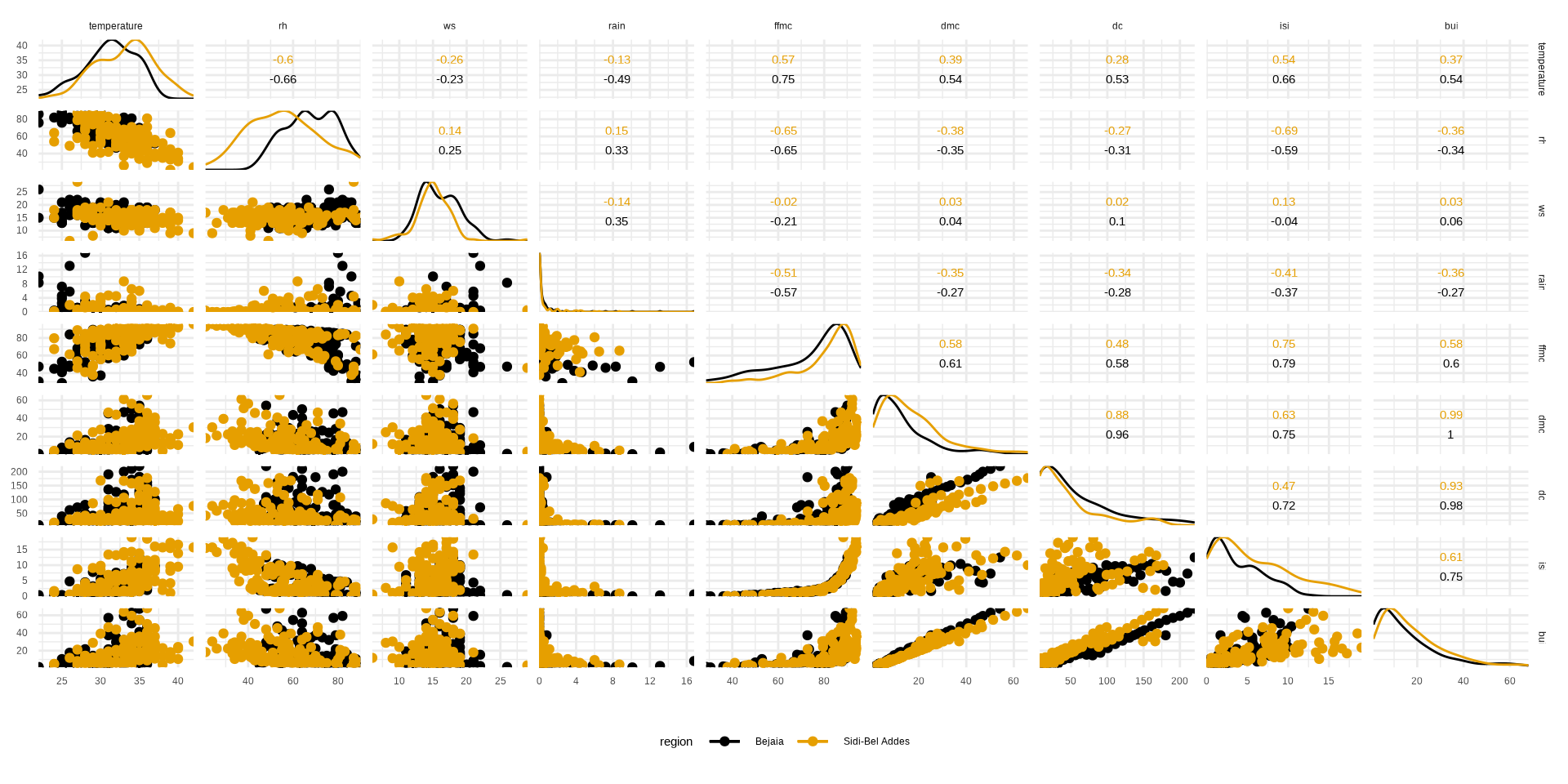
Explanatory Variable
Code
algeria_tbl |>
  ggscatmat(
    columns = 6:14,
    color = "region"
  ) +
  theme_minimal() +
  coord_cartesian(expand = FALSE) +
  scale_color_colorblind() +
  theme(
    axis.title = element_blank(),
    legend.position = "bottom"
  )
Figure 3: Distribution and relationship of explanatory variables

STEP IV Visualize …

Response vs explanatory variable

  • Bivariate plot
  • Categorical vs Categorical data
Code
algeria_tbl |> 
  summarize(
    .by = c(region, classes),
    count = n()
  ) |> 
  ggplot(aes(region, count, fill = classes)) +
  geom_col(position = "dodge", col = "#030303") +
  labs(
    x = "Region",
    y = "Count",
    fill = "Wildfire occurrence",
    title = "Fire occurrence across Algeria's Forest",
    subtitle = "Sidi Bel Abbès experiences more wildfires than Béjaïa",
    caption = "Visuals by Adu Olamide M."
  ) +
  geom_label(
    aes(label = count), 
    position = position_dodge(width = 1),
    show.legend = FALSE,
    size = 4.5
  ) +
  scale_y_continuous(
    limits = c(0, 90),
    breaks = seq(0, 90, 15)
  ) +
  scale_fill_manual(
    values = c("#dc730e", "#dcf3ff"),
    labels = c("Fire", "No Fire")
  ) +
  coord_cartesian(expand = FALSE) +
  theme_pander(
    base_size = 24,
    base_family = main_font
  ) +
  theme(
    plot.title = element_text(
      colour = "#AA4203",
      family = title_font_2,
      size = 32,
      margin = margin(b = 5, unit = "pt")
    ),
    plot.subtitle = element_textbox_simple(
      color = "#dc730e",
      margin = margin(b = 5, unit = "pt")
    ),
    axis.text = element_text(color = "#AA4203"),
    axis.title.y = element_text(color = "#AA4203") 
  )
Figure 4

STEP IV: Visualize …

Response vs explanatory variable

  • bivariate plot
  • Continuous vs continuous
Code
algeria_tbl |> 
  ggplot(aes(date, fwi,)) +
  geom_line(
    linewidth = 0.8,
    col = "#AA470e"
  ) +
  theme_pander(base_size = 24) +
  labs(
    x = "Date",
    y = "FWI",
    title = "Trend of FWI from June to October",
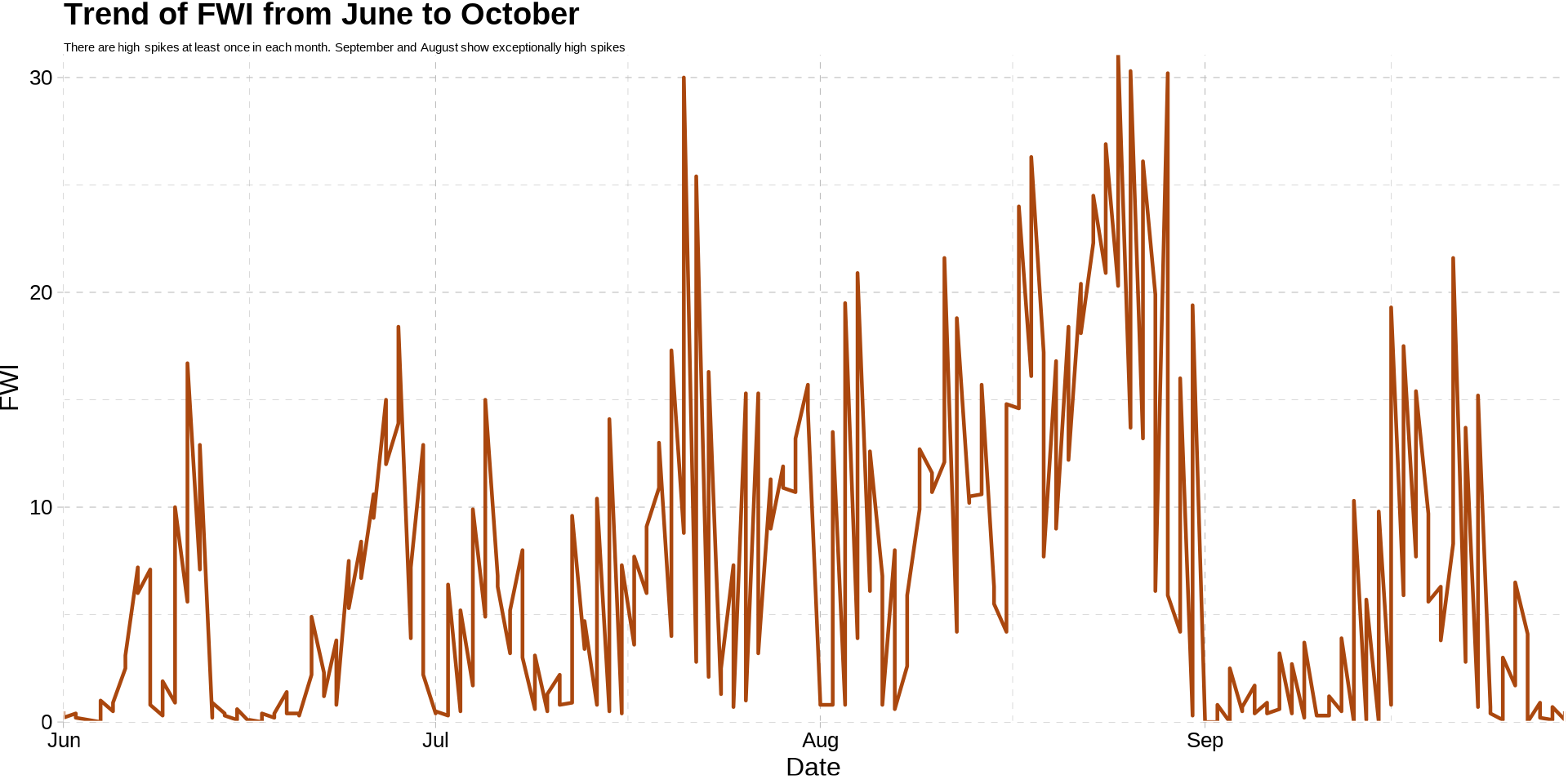
    subtitle = "There are high spikes at least once in each month. September and August show exceptionally high spikes"
  ) +
  coord_cartesian(expand = FALSE) +
  theme (
    plot.subtitle = element_textbox_simple()
  )
Figure 5

STEP IV: Visualize …

Response vs explanatory variable

  • multivariate plot
  • Categorical vs continuous
Code
algeria_tbl |> 
  ggplot(aes(date, fwi, col = classes)) +
  geom_line() +
  facet_wrap(~region)+
  theme_pander(
    base_size = 24,
    base_family = main_font
  ) +
  labs (
    y = "FWI",
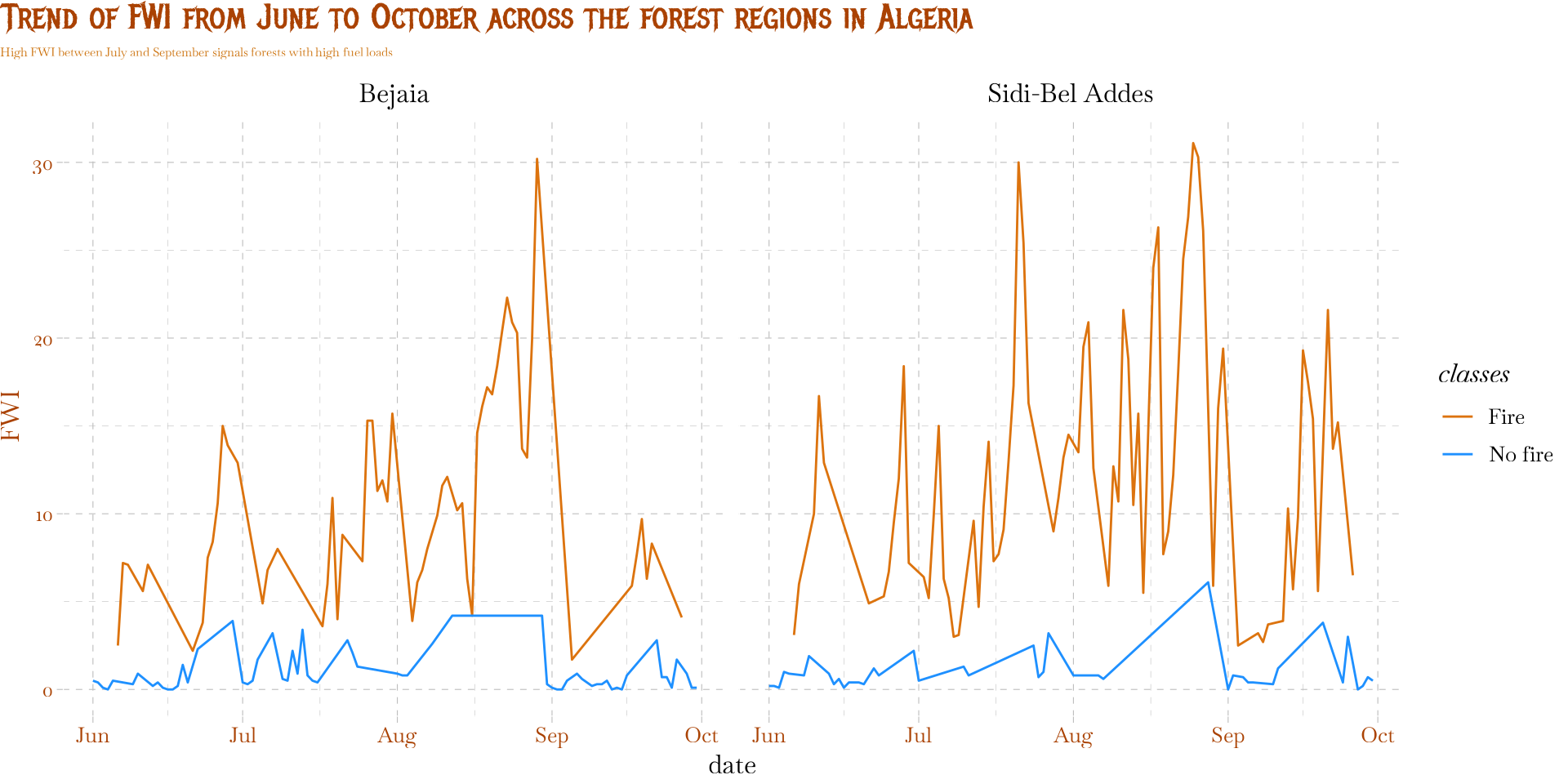
    title = "Trend of FWI from June to October across the forest regions in Algeria",
    subtitle = "High FWI between July and September signals forests with high fuel loads"
  ) +
  scale_color_manual(
    values = c("#dc730e", "dodgerblue"),
    label = c("Fire", "No fire")
  ) +
  theme(
    plot.title.position = "plot",
    plot.title = element_text(
      colour = "#AA4203",
      family = title_font,
      size = 32,
      margin = margin(b = 5, unit = "pt")
    ),
    plot.subtitle = element_textbox_simple(
      color = "#cd730e",
      margin = margin(b = 5, unit = "pt")
    ),
    axis.text = element_text(color = "#AA4203"),
    axis.title.y = element_text(color = "#AA4203") 
  )
Figure 6

STEP IV: Visualize …

Some things to keep in mind

  • There are more ways to combine data types to create visuals with clear messages.
  • Use visualization for exploration
  • Visualization should help you understand your data better
  • Possible actions and transformations to be carried out on variables can be discovered when visualizing so keep an eye out.

Modeling Environmental Data

Some factors that influence the choice of models

  • data types: categorical (binomial, multinomial) / continuous / discrete (count)
  • size of data
  • linearity of variables
  • distribution of variables (normal / non-normal data / tweedie)
  • explainability vs prediction

STEP V: Simple Linear Regression

  • The general structure of linear regression: \[ y = \beta_0 + \beta_1X + \epsilon \]

  • Where:

    • \(y\) is the response/dependent variable
    • \(X\) is the explanatory/independent variable
    • \(\beta_0\) is the intercept
    • \(\beta_1\) is the slope
    • \(\epsilon\) is the error term.

STEP V: SLR …

  • For example, let’s check the relationship between FWI and temperature
fwi_mod_1 <- algeria_tbl |> 
  lm(fwi ~ temperature, data = _)

summary(fwi_mod_1)

Call:
lm(formula = fwi ~ temperature, data = algeria_tbl)

Residuals:
     Min       1Q   Median       3Q      Max 
-14.2609  -4.1322  -0.8441   3.1630  22.2915 

Coefficients:
            Estimate Std. Error t value Pr(>|t|)    
(Intercept) -30.2300     3.5049  -8.625 8.57e-16 ***
temperature   1.1587     0.1083  10.704  < 2e-16 ***
---
Signif. codes:  0 '***' 0.001 '**' 0.01 '*' 0.05 '.' 0.1 ' ' 1

Residual standard error: 6.132 on 242 degrees of freedom
Multiple R-squared:  0.3213,    Adjusted R-squared:  0.3185 
F-statistic: 114.6 on 1 and 242 DF,  p-value: < 2.2e-16

STEP V: SLR …

  • What if we add more variables:

    • temperature,
    • relative humidity, rh
    • wind speed, ws
    • rain, and so on.
Code
fwi_mod_2 <- algeria_tbl |> 
  select(temperature:fwi) |> 
  lm(fwi ~ + ., data = _)

summary(fwi_mod_2)

Call:
lm(formula = fwi ~ +., data = select(algeria_tbl, temperature:fwi))

Residuals:
     Min       1Q   Median       3Q      Max 
-13.2321  -0.1835   0.1867   0.4353   2.1948 

Coefficients:
             Estimate Std. Error t value Pr(>|t|)    
(Intercept)  1.562252   1.520260   1.028    0.305    
temperature -0.009040   0.032015  -0.282    0.778    
rh          -0.001027   0.008532  -0.120    0.904    
ws          -0.010186   0.030767  -0.331    0.741    
rain         0.005391   0.047409   0.114    0.910    
ffmc        -0.051895   0.010255  -5.061 8.46e-07 ***
dmc         -0.012418   0.053915  -0.230    0.818    
dc          -0.009972   0.007922  -1.259    0.209    
isi          1.228153   0.036153  33.971  < 2e-16 ***
bui          0.291787   0.067580   4.318 2.33e-05 ***
---
Signif. codes:  0 '***' 0.001 '**' 0.01 '*' 0.05 '.' 0.1 ' ' 1

Residual standard error: 1.191 on 234 degrees of freedom
Multiple R-squared:  0.9753,    Adjusted R-squared:  0.9743 
F-statistic:  1025 on 9 and 234 DF,  p-value: < 2.2e-16

Other variables used include: - dmc - dc - isi - bui

Are the Assumptions Met?

  1. Linearity: Is the relationship truly a straight line?
  2. Independence: Are errors related?
  3. Normality: Are residuals bell-shaped?
  4. Homoscedasticity: Constant variation?

Model Interpretation

While the model captured signals well, it shows:

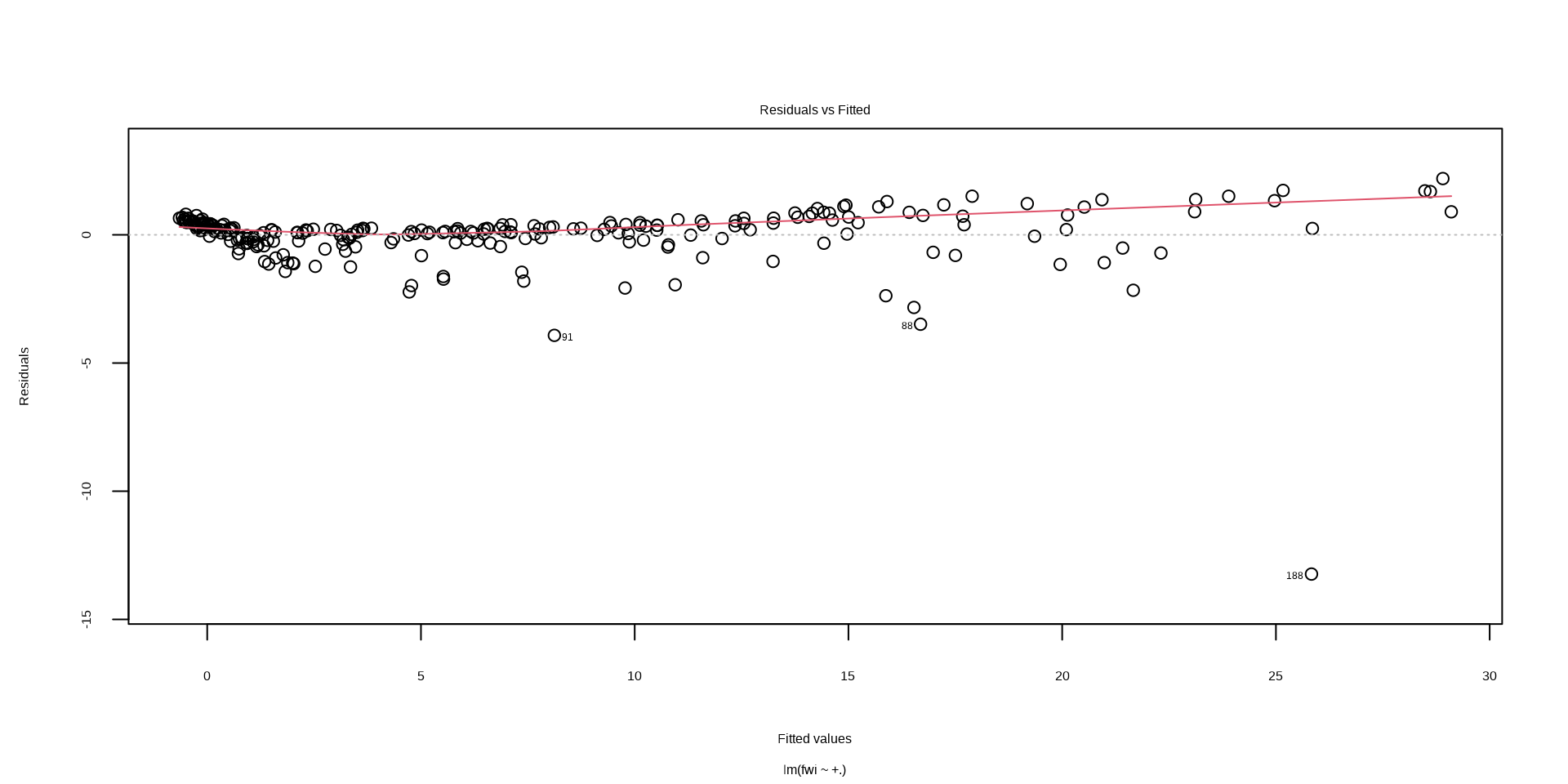
  • heteroscedasticity (fan shape). It captures lower values more accurately than higher values.
  • potential non-linear relationship. There is a pattern in the data that the current linear model is missing.
Code
plot(fwi_mod_2, which = 1)

Code
algeria_tbl |> 
  ggplot(aes(fwi)) +
  geom_histogram(
    stat = "density",
    col = "#dc730e"
  ) +
  geom_density(
    linewidth = 1.3,
    col = "#AA4203"
  ) +
  geom_label(
    aes(
      x = 15,
      y = 0.02,
      label = "Non-normal distribution")
  ) +
  geom_hline(aes(yintercept = 0.074, x=25)) +
  geom_textbox(
    aes(x = 10, y = 0.08, label = "There are a lot of observations around point zero. Zeros affect linear models")
  ) +
  theme_clean(
    base_size = 32,
    base_family = main_font_2
  ) +
  scale_y_continuous(
    breaks = seq(0, .1, .02),
    limits = c(0, .1)
  ) +
  labs(
    x = "Forest Weather Index",
    y = "Density",
    title = "Distribution of FWI",
    subtitle = "The distribution shows a long right tail; modeling this distribution might require transformation",
    caption = "Data source: UCI Machine Learning Repository | Adu O. M."
  ) +
  coord_cartesian(expand = FALSE) +
  theme(
    plot.title.position = "plot",
    plot.title = element_text(
      colour = "#AA4203",
      family = title_font_2,
      size = 32,
      margin = margin(b = 5, unit = "pt")
    ),
    plot.subtitle = element_textbox_simple(
      color = "#dc730e",
      margin = margin(b = 5, unit = "pt")
    ),
    axis.text = element_text(color = "#AA4203"),
    axis.title.y = element_text(color = "#AA4203")
  )
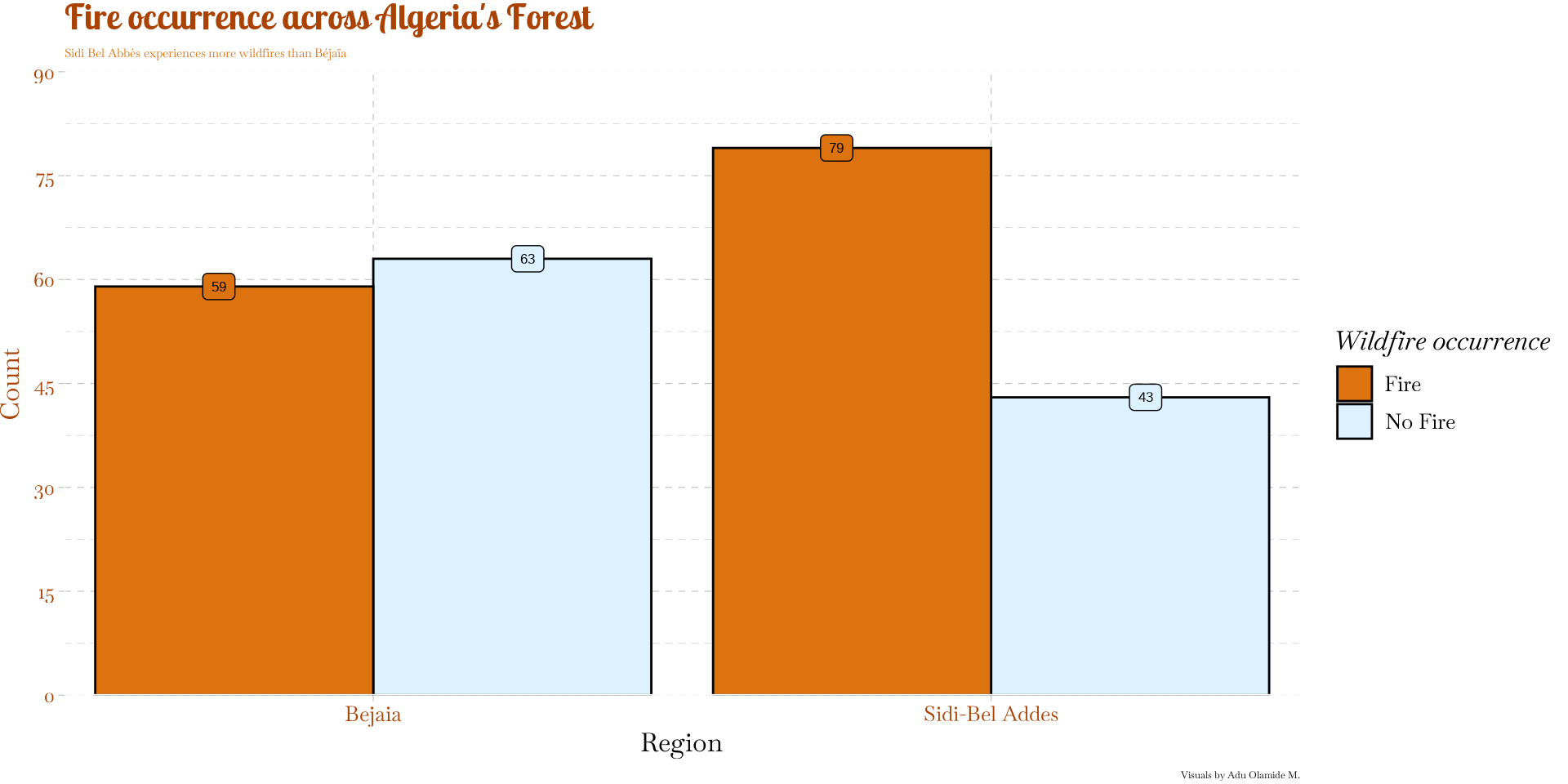

Figure 7

Summary & Next Steps

  • Environmental data is messy — EDA is your best friend.
  • Statistical significance does NOT always mean practical importance.
  • Simple models provide quick insights but have assumptions.
  • Transform where necessary:
    • log transformation
    • Adding + 1 to fwi
    • Use a log link (GLM), or Tweedie regression.

Questions?

Check out and follow our page @eustudyassist on YouTube if you are interested in learning R!